This article contains affiliate links. If you buy through our links, we may earn a commission at no extra cost to you. I’m writing this from six months of first-hand use, not a feature-list summary.
| Rating | 4.5/5 |
| Price | Free plan available; PRO $8.99/month billed annually (about $108/year), often discounted in seasonal sales (verify current pricing) |
| Best for | Freelancers who build or manage WordPress sites, especially anything with a local-SEO angle |
| Skip if | Your site is static (Hugo, Astro, plain HTML): Rank Math is WordPress-only |
| Set up Rank Math → | |
Most SEO plugin reviews are written by people who installed the tool for an afternoon, screenshotted the dashboard, and called it tested.
This one is different. I ran Rank Math for six months on a client’s WordPress site, a dental clinic, which meant I was living in its local SEO and on-page features every week, not just clicking through the setup wizard once. That’s a local-business site rather than a freelance portfolio, but the day-to-day reality is the same one most freelancers face: a WordPress install, a client who wants to show up on Google, and no budget for an SEO agency.
Here’s what held up, what annoyed me, and who should actually install it.
What Rank Math Is
Rank Math is a WordPress SEO plugin. It sits in your WordPress admin and handles the technical and on-page side of SEO that WordPress does not do on its own: meta titles and descriptions, XML sitemaps, structured data (schema), Search Console connection, redirections, and on-page content scoring.
It is freemium. The free version is genuinely capable. The PRO version adds the Content AI writing assistant, advanced schema, deeper local SEO, and analytics integration. The main competitor is Yoast SEO, which most WordPress users have heard of first.
If you build or maintain WordPress sites for yourself or for clients, this is the category of tool you need one of. The question is which one, and whether the paid tier earns its keep.
The Setup: Genuinely the Easiest Part
The thing that gets undersold about Rank Math is how fast it gets out of your way.
The setup wizard walks you through connecting Google Search Console, choosing whether the site is a personal blog, a business, or a portfolio, and switching on only the modules you need. Submitting the site and its sitemap to Google happened through the plugin, so I never had to manually paste a sitemap URL into Search Console or fiddle with verification files. For a freelancer setting up a client site, that is fifteen minutes saved on every project and one less thing to explain to the client.
I had never used Yoast directly before this, so I won’t pretend to a hands-on comparison I didn’t do. But I did put both interfaces side by side before committing, and Rank Math’s was the easier one to read: clearer module toggles, a less cluttered settings layout, and a setup flow that did not assume I already knew SEO jargon. On UI alone, it was the obvious pick.
The Per-Post SEO Score: Useful, Not Gospel
Every time you write a page or post, Rank Math scores it out of 100 against a checklist: is the keyword in the title, the URL, the first paragraph, the meta description, an image alt tag, and so on.
I leaned on this constantly. Not because hitting 100 is the goal, it isn’t, and chasing a perfect score will make your writing worse, but because it’s a fast checklist that catches the boring misses. Forgot the meta description. Title too long. No internal link. For a freelancer who does SEO as one of ten things they handle rather than a full-time specialty, that running checklist is the difference between shipping a page that’s technically sound and shipping one with three easy gaps.
Treat the score as a pre-flight checklist, not a grade. That framing is where it earns its value.
Local SEO: Where It Earned the Upgrade
This is the part I have the most real mileage on, because the client was a dental clinic and local search was the entire game.
Rank Math handles LocalBusiness schema markup, the structured data that tells Google a business’s name, address, hours, and service area. Setting that up properly is fiddly to do by hand and easy to get wrong. Rank Math turned it into a form. For a service business that lives or dies on showing up in the local map results, getting that schema clean and consistent mattered more than almost anything else on the site.
Local SEO is one of the two reasons I moved from the free plan to PRO. If you do any work for local clients, plumbers, clinics, salons, trades, restaurants, this is the feature that justifies the plugin on its own. It’s also a genuine freelance upsell: “I’ll set up your local SEO properly” is a line item a client understands and pays for.
See Rank Math’s local SEO tools →
Redirections and the llms.txt File
Two smaller things worth flagging because they saved me time.
The redirection manager is built in, so when a page URL changed I could set up the 301 redirect inside WordPress without a separate plugin. On a client site that evolves over months, broken old links are inevitable, and having redirects one click away kept the site clean.
Rank Math also generates an llms.txt file, the emerging standard that tells AI search engines and assistants how to read your site. It’s early days for whether that moves the needle, and I’d be lying if I told you I measured a citation lift from it. But it’s a one-toggle setup for a freelancer who wants a client site to be legible to AI search as well as Google, and that future-proofing is an easy thing to include.
The One Real Frustration: The AI Credit Upsell
Nothing is free of friction, and here’s mine.
The second reason I upgraded to PRO was Content AI, Rank Math’s built-in writing and optimization assistant. It’s useful. But it runs on a credit system, and the plugin pushes you toward topping those credits up more than I’d like. The prompts to buy more AI credits show up in the workflow often enough to feel like an upsell rather than a feature.
My honest advice: price PRO on its SEO features, the local SEO, the advanced schema, the analytics, and treat Content AI as a bonus rather than the reason you pay. If you go in expecting unlimited AI, you’ll hit the credit wall and feel nickel-and-dimed. If you go in for the SEO toolkit and use the AI occasionally, PRO is fair value.
What We Liked
- Setup wizard and Search Console submission are genuinely fast, saves time on every client site
- Free tier is capable: schema, sitemaps, redirections, and on-page scoring with no paywall
- Local SEO and LocalBusiness schema are excellent, the standout for client service businesses
- Per-post SEO score works as a fast pre-flight checklist
- UI is cleaner and easier to learn than the alternative
- llms.txt generation is a one-toggle future-proofing for AI search
Worth Knowing
- The Content AI credit system feels like a recurring upsell inside the workflow
- WordPress-only: useless for static or non-WordPress sites
- Hitting a high SEO score can tempt over-optimized writing if you treat it as a grade
- PRO pricing is best justified by SEO features, not the AI
Free vs PRO: Which One You Actually Need
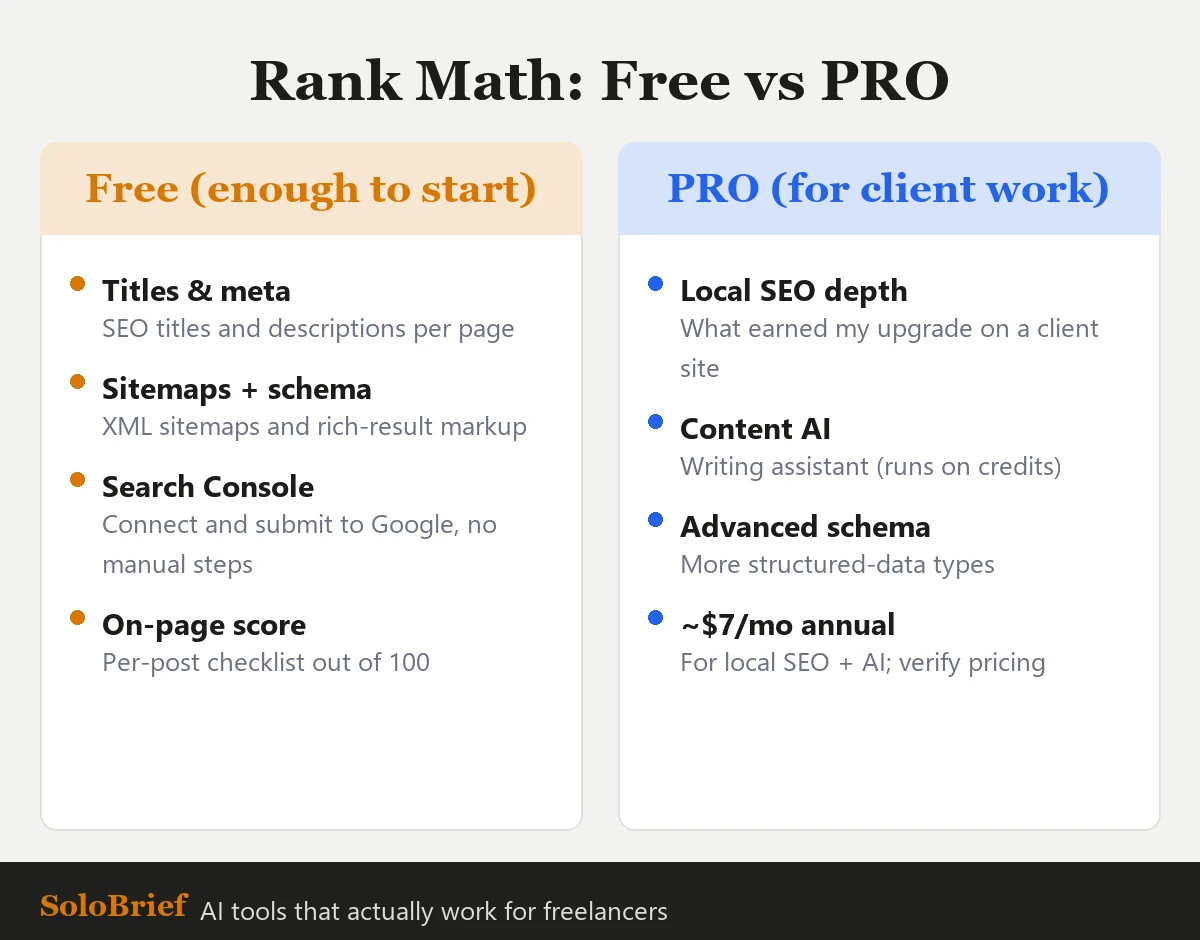 What’s in each tier, based on six months of actual use. The free plan covers most sites; PRO earns its place on client and local-SEO work.
Stay on free if: you’re running a single portfolio or a simple WordPress site and you mainly need titles, meta descriptions, sitemaps, schema, and the on-page score. The free version covers all of that without nagging you to pay.
Upgrade to PRO if: you do local SEO for clients, or you want the Content AI assistant and accept the credit model. PRO sits at $8.99/month billed annually at the time of writing (about $108/year, and often discounted in seasonal sales), though you should check current pricing before committing because these plans change. For one client project with a local angle, I found the PRO cost easy to fold into the project fee.
The freelancer math is simple: if a single client engagement pays for a year of PRO in one line item, the decision makes itself.
Who Should Install Rank Math
If you build or manage WordPress sites, this is an easy recommendation. My own takeaway after six months matches the blunt version: if you’re on WordPress, use it, regardless of the kind of site or business you’re running.
The only people who should skip it are those not on WordPress at all. If your portfolio is a static site built with Hugo, Astro, or plain HTML, like the site you’re reading this on, an SEO plugin is not the tool you need. Everyone else on WordPress: install the free version today, and upgrade to PRO the first time a client’s local SEO or an AI workflow makes it pay for itself.
If you are still choosing where to host that WordPress site, our best web hosting for freelancers guide walks through the full setup, including where Rank Math fits in at Step 7.
Set up Rank Math on your WordPress site →
The Bottom Line
Rank Math earned a 4.5 out of 5 from me, and the half-point I held back is entirely about the AI credit upsell, not the SEO product, which is excellent. After six months of real use on a client site, the setup speed, the local SEO depth, and the cleaner interface made it a tool I’d reach for again on the next WordPress project without hesitating.
For freelancers who touch WordPress, and most who build client sites do, it’s one of the few tools where the free version is good enough to start today and the paid version is fair the moment a client makes it earn its place.
Frequently asked questions
Is Rank Math good for freelancers?
Is Rank Math PRO worth it?
Rank Math vs Yoast: which is easier?
Does Rank Math slow down a WordPress site?
Based on six months of first-hand use on a client WordPress site through June 2026. Pricing is approximate and changes often, always check Rank Math’s current plans before purchasing.