This article contains affiliate links. If you buy through our links, we may earn a commission at no extra cost to you. We only recommend tools we’ve researched thoroughly.
You need a portfolio site. You don’t want to pay $20 a month for it.
That’s most freelancers, and it’s a reasonable position. A solo portfolio doesn’t need enterprise infrastructure. It needs to load fast, stay up, look professional, and not eat into your margin every month.
Hostinger is worth it for most freelancers starting out. Under $3/month with the current promo (India market: hostinger.com/in), it’s one of the few budget options that doesn’t embarrass you in front of clients. The pricing also hides a catch worth knowing about. Both parts below.
Quick Verdict
| Rating | 4.1/5 |
| Price | From ₹69/month (promo) |
| Best for | Freelancers launching a first portfolio site |
| Skip if | WooCommerce at scale or needing server-level control |
| Check current Hostinger pricing → | |
What you get for under $3/month
The Premium plan is where most freelancers land. Here is what is actually included and why each item matters for a freelance portfolio:
100 GB SSD storage. A typical freelance portfolio with 20 to 30 portfolio images, a blog, and a contact form uses under 2 GB. You will not come close to 100 GB with a normal client-facing site.
Free domain for the first year. Included on all annual plans. Pick your domain at signup. After year one, renewal is paid separately at standard registrar rates (typically 800 to 1,500 rupees per year). Don’t buy the domain separately elsewhere before signing up, you’ll miss the bundled discount.
Free SSL. SSL is now table stakes: browsers flag sites without it as insecure, and Google factors it into rankings. Hostinger includes Let’s Encrypt SSL at no extra cost on all plans. It activates automatically after domain connection.
Email accounts. You can create professional email addresses at your domain ([email protected], [email protected]) and either use them via webmail or forward them to your existing Gmail. For most freelancers, one forwarding address is all you need.
Weekly automated backups. The Premium plan includes weekly backups. Not daily, which is worth knowing. If you make a significant mistake on a Wednesday and the last backup was Saturday, you lose four days of changes. For a slow-moving portfolio site, weekly is fine. If you want daily backups, that’s the Business plan.
LiteSpeed web server. LiteSpeed outperforms Apache (used by most budget hosts) at equivalent resource levels. This is why Hostinger’s load times in third-party tests run faster than comparably priced hosts.
AI website builder. A drag-and-drop builder that generates a starting site from a text prompt. Useful if you want to launch without a WordPress learning curve. Less useful once you want a blog, custom landing pages, or anything beyond a basic five-page site.
What you don’t get: staging environments, dedicated IPs, Git from the panel, or granular server control. For a portfolio site, you won’t miss any of that.
Hostinger pricing: what you actually pay
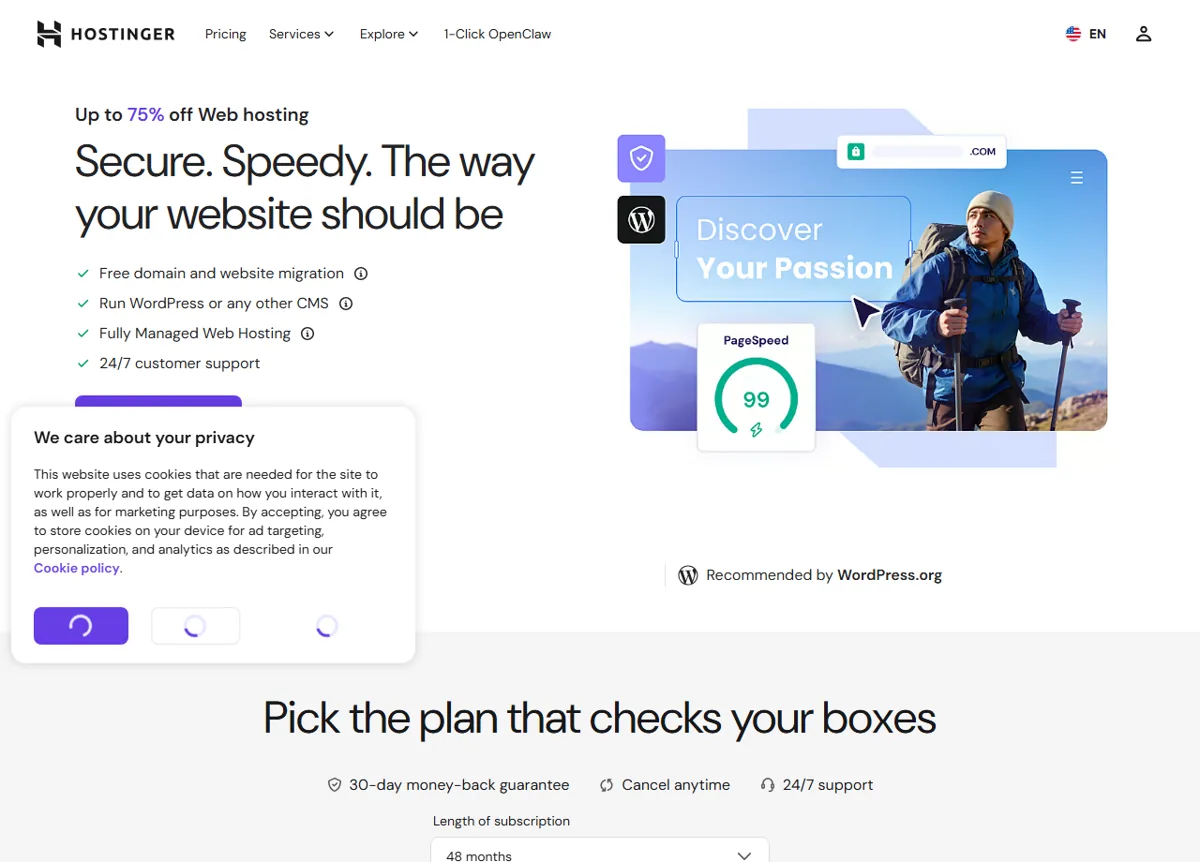 Hostinger’s pricing page. The promo rate is tied to a long term (note the 48-month default) and steps up at renewal. Public pricing page, June 2026.
This is the part most reviews skip past. Here it is upfront.
Hostinger plan pricing breakdown
| Plan | Promo price | Renewal price | Best for |
|---|---|---|---|
| Single | ~₹69/month | ~₹289/month | One small site; limited features |
| Premium | ~₹149/month | ~₹449/month | Most freelancers, start here |
| Business | ~₹249/month | ~₹649/month | Faster resources + daily backups |
| Cloud Startup | ~₹699/month | ~₹2,099/month | High-traffic sites; overkill for portfolios |
India market pricing via hostinger.com/in. Prices approximate; check current rates, as promotions change frequently.
The promo price applies to your first term (12, 24, or 48 months). At renewal, you pay the standard rate, roughly 3x higher. Every major host does this, but it’s worth knowing before you commit to the cheapest-looking plan.
Lock in the longest term you’re comfortable with. A 48-month Premium plan at promo pricing runs significantly cheaper per month than a 12-month renewal at standard rates.
Setting up your portfolio site: step by step
Hostinger’s onboarding is among the smoother ones in the budget host category, based on what users consistently report across review platforms. Here is the actual flow from signup to live site.
Step 1: Choose your plan and term at signup
Premium is the right plan for most freelancers. Single limits you to one website with reduced resources. Business adds cost without meaningful benefit for a portfolio site. More important than the plan is the term: commit to the longest period you are comfortable with. A 48-month Premium plan at promo pricing costs significantly less per month than a 12-month plan at renewal rates.
Step 2: Register or connect your domain
If you don’t have a domain, register one during signup using the included free domain offer. Pick a .com if it’s available for your name. If you already own a domain from another registrar, point your existing domain to Hostinger’s nameservers from your registrar’s DNS panel. DNS propagation takes up to 48 hours, so plan accordingly if you have a launch date in mind.
Step 3: Install WordPress from hPanel
Go to hPanel, then Websites, then Install WordPress. The installer takes under 2 minutes. Choose your site language, set your admin username and a strong password, and confirm. You get a dashboard link immediately.
Step 4: Install a fast, portfolio-ready theme
The default WordPress theme is not suitable for a professional portfolio. Install one of these free themes: Astra, GeneratePress, or Kadence. All three are lightweight, fast, and include pre-built portfolio starter templates. Avoid bloated multipurpose themes with 50 features you won’t use.
Step 5: Build your five core pages
A freelance portfolio site needs exactly five pages: Home, About, Services, Work (your portfolio gallery), and Contact. A clean five-page site with clear writing outperforms a complicated ten-page site every time. Use a contact form plugin (WPForms Lite is free and sufficient) on the Contact page.
Step 6: Set up your professional email
hPanel includes email accounts. Create [email protected] and either use it directly via webmail or forward it to your Gmail using the email forwarding setting. Most freelancers prefer forwarding so all email arrives in one inbox.
Step 7: Connect your domain and activate SSL
If you registered your domain through Hostinger, the connection is automatic. If you brought your own domain, add Hostinger’s nameservers at your external registrar. SSL activates automatically after domain connection but can take up to 24 hours to fully propagate.
The full process takes 2 to 3 hours including theme customisation and adding your portfolio content. Some freelancers complete it in under an hour with a minimal setup.
WordPress Websites made easy: Hostinger Complete Set Up Start to Finish
If you prefer to skip WordPress, Hostinger’s AI website builder generates a starting site from a short text prompt describing your services. It is less flexible than WordPress for anything beyond a simple portfolio, but it is faster to launch and requires no theme decisions.
Speed and uptime: what the data shows
Hostinger runs on LiteSpeed web servers, which gives it a speed edge over Apache-based budget hosts at the same price point. Data from GTmetrix and independent monitoring services (2025 to 2026) consistently shows:
- Average load time: 400 to 700ms for basic WordPress sites (varies by plan and region)
- Uptime: 99.9% claimed; independent monitoring generally confirms 99.8 to 99.95% in practice
- Nearest server to India: Singapore
For a portfolio with text, images, and a contact form, this is more than adequate. Clients won’t notice a 600ms load time. Where you’d feel the limits is running WooCommerce with 100+ products or handling significant concurrent traffic, that’s outside what the budget plans are built for.
Customer support: the honest truth
Hostinger is in the middle of the pack here.
24/7 live chat is genuinely available and handles basic questions well. The knowledge base covers most common setup tasks with step-by-step articles, WordPress install, email setup, domain connection.
Where it gets inconsistent: users across Trustpilot, G2, and Reddit report that support quality varies depending on who you get. Simple questions resolve quickly. Complex issues, migrations, billing disputes, server-level problems can take longer and sometimes need escalation before you get a useful answer.
If you’re building a straightforward portfolio, you’re unlikely to run into the difficult edge of that. The knowledge base covers most use cases. But if you know you’ll need regular technical support for custom configurations, Hostinger’s support track record at this price point may frustrate you. SiteGround costs more and has consistently stronger reviews on support.
Hostinger vs Bluehost vs SiteGround
| Hostinger Premium | Bluehost Basic | SiteGround Startup | |
|---|---|---|---|
| Promo price | ~₹149/month | ~₹219/month | ~₹269/month |
| Renewal price | ~₹449/month | ~₹699/month | ~₹1,299/month |
| Free domain | Yes (annual) | Yes (first year) | No |
| Free SSL | Yes | Yes | Yes |
| Speed | Good (LiteSpeed) | Average | Excellent |
| Support | Inconsistent | Average | Strong |
| Best for | Budget portfolio sites | WordPress beginners | Performance-first sites |
Price is the decision: Hostinger wins on cost. If support and performance matter more than cost, SiteGround is worth paying for. Bluehost sits awkwardly in the middle, more expensive than Hostinger and slower than SiteGround.
View the full web hosting comparison for freelancers →
Who should use Hostinger
What We Liked
- Best for freelancers launching a first portfolio site: fast setup, one-click WordPress, LiteSpeed performance
- Specifically competitive for Indian market freelancers via hostinger.com/in
- Side-project sites and landing pages where budget matters more than raw performance
- First-time site builders who want WordPress without needing a developer
Worth Knowing
- Developers needing SSH access, Git from panel, or staging environments at this price
- Freelancers running WooCommerce stores with meaningful concurrent traffic: will outgrow shared hosting
- Support is inconsistent on complex or technical issues; fine for basic setup questions
- No SLA-backed uptime guarantees: managed WordPress hosts provide these at higher prices
The renewal question: is it still worth it at year 2?
At standard renewal rates, Premium runs ~₹449/month. Still cheaper than SiteGround or WP Engine, but no longer the headline deal.
Whether to renew with Hostinger comes down to one question: have your needs changed? If your site is still a simple portfolio and you’re comfortable with the dashboard, renewing makes sense. If your freelance business has grown to where you need better performance or more control, it’s worth migrating to SiteGround or a VPS at renewal time.
Many freelancers lock into 48-month plans at promo pricing to push that decision off by four years. It’s reasonable if you’re confident the site will stay active.
How to get started
The current India market promo is at hostinger.com/in.
A few things before you click through:
- Choose the longest term you’re comfortable with. Per-month rate drops significantly from 12-month to 24- and 48-month plans.
- Premium is the right tier for most freelancers. Single is too limited; Business adds cost without enough benefit for a simple portfolio.
- The free domain is included on annual plans, don’t buy it separately elsewhere.
- Budget 2 to 3 hours for initial setup. WordPress installs in one click, but theme setup and adding your content takes time.
If you want to see how Hostinger compares across five budget hosting options, we have a full side-by-side in our best web hosting for freelancers guide →.
Frequently asked questions
Is Hostinger good for freelancers in India?
What happens to my Hostinger price at renewal?
Does Hostinger support WordPress?
How fast is Hostinger for a portfolio site?
Is Hostinger reliable enough for client-facing work?
The bottom line
Hostinger works for most freelancers who need a portfolio site and don’t want to pay for infrastructure they won’t use. LiteSpeed performance, a free domain, and India-market pricing make it a genuine value at promo rates.
It’s not the choice if you need strong technical support, plan to build something beyond a basic portfolio, or have specific server requirements. Those situations call for a bigger budget.
For most freelancers just getting online: under ₹150/month for a site that loads fast and doesn’t require a tech background to maintain is a fair trade.
Get the current Hostinger deal →
Pricing accurate as of May 2026 but subject to change. Verify current rates on the Hostinger site before purchasing.