TL;DR
- The billing unit decides the cost, not the feature list. n8n bills per workflow execution, Zapier per successful action, Make per module action.
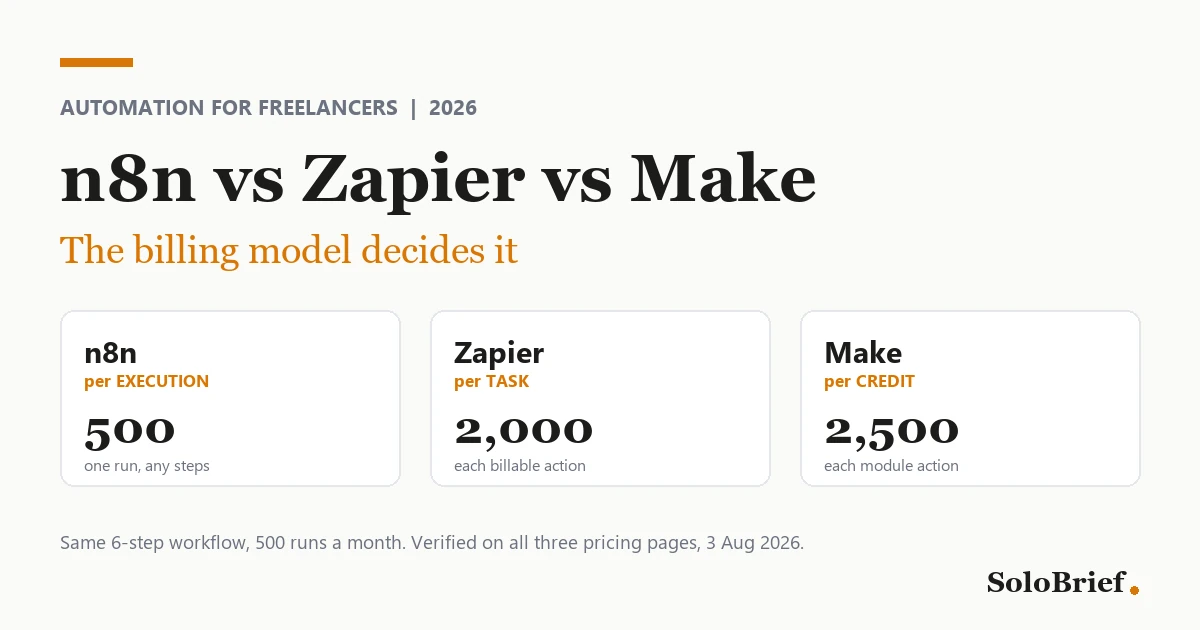
- A 6-step workflow running 500 times a month is 500 n8n executions, 2,000 Zapier tasks and 2,500 Make credits.
- Pick Zapier if your automations are small and you never want to think about them, Make if you want most of n8n’s power without the setup cost, and n8n if you run high-volume workflows and are comfortable hosting something.
- Zapier is the easiest to learn; n8n is the cheapest at volume. Pricing verified against all three vendor pages on 3 August 2026.
Most people arrive at this comparison holding an invoice. The workflow did not change, the volume did, and the plan that covered January had quietly stopped covering March.
Most comparisons of these three line the features up side by side and leave you to guess. But features are rarely what bites you. What decides this is how each tool counts what you owe it, and all three count differently enough that the same workflow can be cheap on one and expensive on another.
I run a production workflow on self-hosted n8n and I have used Make. I have never paid for Zapier, so everything below about Zapier comes from its own pricing pages and from its users, and I have said so wherever it applies.
Side by side
| n8n | Zapier | Make | |
|---|---|---|---|
| Bills you per | workflow execution | task (each successful action) | credit (each module action) |
| A 6-step workflow, 500 runs/month | 500 executions | 2,000 tasks | 2,500 credits |
| Free tier | Community edition, self-hosted, unlimited | 100 tasks/month | 1,000 credits/month |
| Entry paid plan | USD 20/mo annually, 2,500 executions | USD 19.99/mo annually, 750 tasks | USD 9/mo, 5,000 credits |
| Easiest to learn | third | first | second |
| Cheapest at volume | first | third | second |
| Instant triggers | polling by default | yes | yes |
| Runs without your machine on | only if hosted | yes | yes |
| Human approval step | build it yourself | available | built in |
Pricing verified against all three vendor pages on 3 August 2026.
If you want one sentence: pick Zapier if your automations are small and you never want to think about them, pick Make if you want most of n8n’s power without the setup cost, and pick n8n if you run high-volume workflows and are comfortable hosting something.
Why Power Automate is not in this comparison. It comes up constantly alongside these three, so it is worth saying why it is absent rather than leaving you to wonder. Power Automate is licensed through Microsoft 365 user seats and assumes Azure identity, which makes it a sensible default for staff inside a Microsoft organisation and an awkward one for a freelancer choosing tools from scratch. We have also not run it, so including it would mean reviewing something we have never used. There is a fuller answer in the questions at the end.
The billing unit is the whole story
Almost every comparison gets this part wrong, and usually in Zapier’s favour.
Zapier bills per task, where a task is one successful action. It does not bill triggers, and it does not bill its own built-in tools. Formatter, Paths, Filter, Delay, Looping, Sub-Zap, Digest, Zapier Manager, Storage, Tables and Forms are all free, and failed actions are not counted either.
That matters, because the standard argument against Zapier counts every visible step in a Zap and arrives at a scary number. The number is wrong. If you see a comparison claiming a six-step Zap costs six tasks per run, the author did not read the pricing page.
n8n bills per workflow execution. One full run counts once, whether the workflow has three nodes or thirty.
Make bills per credit, one for each module action. Its pricing page now says credits where the community and most articles still say operations. Same thing. Router modules and error handlers are free.
A worked example you can recount yourself
Take a realistic freelancer workflow. A form submission arrives, a filter drops the incomplete ones, then four things happen: create a CRM record, draft an invoice, send an email, append a row to a sheet. Six visible steps. It fires 500 times a month.
| What actually gets billed | Monthly total | |
|---|---|---|
| Zapier | trigger free, filter free, 4 actions billable | 4 × 500 = 2,000 tasks |
| n8n | the whole run counts once | 500 executions |
| Make | trigger module + 4 action modules | 5 × 500 = 2,500 credits |
So the honest gap between n8n and Zapier on this workflow is about four to one, not the six to one you get from naive step counting. Four to one is still decisive. It is also defensible line by line, which the inflated version is not.
Now notice what that does to the plans. 2,000 tasks puts you past Zapier’s 750-task entry tier. 500 executions sits comfortably inside n8n’s 2,500-execution Starter plan at 20 US dollars a month. 2,500 credits fits Make’s 5,000-credit plan at 9 US dollars.
If you would rather see all three side by side before reading on, this third-party walkthrough covers the same ground visually.
Make vs n8n vs Zapier, side by side comparison
The cost driver is fan-out, not workflow length
There is a second-order effect that matters more than step count once you are past toy automations, and Zapier’s own community is the best place to see it.
One user described a loop processing spreadsheet rows: “each step within the loop is consuming tasks individually. For example, if 5 rows are processed, the number of tasks used is significantly higher than expected.” A Zapier community manager confirmed the free-step list in the same thread (“The Looping, Filter and Delay actions themselves [would not count towards your task usage]”) and helped restructure the Zap down to two tasks per row. (Zapier Community, May 2025)
So the rule is: your bill scales with how many items you process, not with how long your workflow is. A short workflow that fans out over 200 records will cost more than a long one that runs once. This is the single most useful thing to internalise before you pick a plan on any of the three.
The number that decides your bill is therefore not the one on your screen today. It is your trajectory: items processed per month, a year out, with the clients you expect to have then. Almost nobody works that out before choosing, which is why the plan that looked generous in month one runs out in month five. Price the workflow you are growing into, not the one you are testing.
We work through the arithmetic behind this in full, for all three platforms, in the fan-out tax. To run your own workflow through all three, use the automation cost calculator.
It is reasonable to read all of this as a trap. Metered pricing does put the entry tier just below what a working month uses, so usage creeps over the cap and the upgrade arrives without anyone choosing it. The defence is not loyalty to a vendor, it is arithmetic: every number in this article comes from a published billing rule, so you can count your own usage before you commit and pick the billing unit that matches the shape of your work. A per-execution meter cannot punish you for adding steps, and a per-task meter cannot surprise you if you have already counted the actions. Either way the overage stops being a mystery, which is the whole point of reading a comparison like this one.
What I actually built, and what broke
I run a self-hosted n8n workflow that handles blog-to-social distribution. A new post publishes, n8n pulls the content, sends it to an AI model with a fixed methodology prompt, converts it into platform-native versions for X, Threads, and an Instagram carousel, pushes each one through the platform API as a draft rather than a live post, then logs what it produced to Google Sheets.
That is six steps across a CMS, a swappable LLM provider, three social APIs and a spreadsheet, with a deliberate human review gate at the end. It is exactly the shape of workflow where per-execution billing pulls away from per-task billing.
What broke, twice, was never n8n. Once the AI model API key ran out of credit and the workflow stopped at the LLM step. Once a social platform authentication expired and it stopped at the posting step. Both times n8n halted at the failing node and told me.
Two things worth taking from that. First, the realistic failure surface of a freelancer automation is credentials and API credit, not the automation tool. Budget for re-authenticating social platforms periodically and keeping credit on your AI keys. Second, failing loudly at the exact node is a real virtue. I am reporting that as observed behaviour of this workflow, not as a platform guarantee.
Where the learning curve actually is
Reviews say n8n has a steeper learning curve and leave it there. Having built the thing above, I can be more specific, because the vague version is not useful to anyone deciding.
The canvas is not the problem. Choosing the operation inside a node is.
Every node exposes a lot of options. Take the Google Sheets node. It wants to know whether you are pulling data from the sheet or updating it, which row, which column, and so on. If you have not already decided precisely what that step is for, you will sit there. n8n assumes you know your data operation and will not infer intent for you. Zapier’s more linear, guided builder walks you through that decision instead.
Realistic time to a first working workflow, and I would publish this as a range rather than an average because the spread is the actual finding:
| Where you are starting from | Time to something that works |
|---|---|
| Beginner, first automation | days to a week |
| Have built automations before | one to two days |
| Comfortable with APIs and data | one afternoon |
The setup cost of n8n is dominated by what you already know, not by the tool.
Self-hosting: cheaper than advertised, with one real catch
Running n8n locally costs nothing. Running it on a small VPS costs the VPS price, which is well under n8n Cloud pricing.
I expected maintenance to be the hidden cost here. In my experience it has not been. The real cost of self-hosting is something else entirely: a locally hosted automation only runs when your machine is on and you have started it. For a workflow that needs to fire on a schedule, or when a client submits something at 2am, that quietly defeats the point.
That, and not maintenance burden, is the honest argument for paying for hosting.
If you want a free cloud host, Railway is the usual suggestion, and it is worth being precise about what free means there. As of 3 August 2026 Railway’s free plan gives 1 US dollar of monthly usage credit at roughly 0.5 GB of memory. Running continuously, memory alone runs about 5 dollars a month, so the free plan covers something closer to a week than a month. The trial gives 5 dollars of credit for 30 days with no card required. Budget about 5 dollars a month for a host that is genuinely always on. That is still far cheaper than Cloud, but “free hosting” oversells it.
AI features, stated carefully
This area moves fast enough that I want to be conservative rather than clever.
Both n8n and Make offer run-time AI agents: AI that makes decisions inside a running automation rather than following a fixed path. n8n describes its agents as autonomous workflows that can make decisions, interact with apps and execute tasks without constant human input, using system prompts, memory and tool access. Make ships AI Agents on every plan, with a next-generation release in February 2026.
n8n additionally offers build-time workflow generation, describing what you want in natural language and having it assemble the nodes for you to refine.
I want to flag something here rather than sell you a neat line. When I first researched this I had a tidy formulation ready: n8n’s AI builds the automation, Make’s AI runs it. It is memorable and it is wrong. Run-time agents are table stakes on both. If you are choosing on AI capability specifically, open both vendor pages yourself on the day you decide, because anything written here has a short shelf life.
What freelancers actually say
Here is what practitioners report in public discussion, organised by where you are starting from. Every item below links to the thread it came from.
If you are just starting out
New n8n users converge on the same handful of blockers. One community guide published on 31 July 2026 put it plainly: “A lot of people jumping into n8n get stuck on the same handful of things early on, what a trigger actually is, why the canvas works the way it does, how data moves between nodes.” (n8n Community)
Note that this differs slightly from my own experience, where the canvas was fine and the node internals were the wall. Both are real. If you are completely new, expect friction at both.
On Make, the recurring beginner surprise is different and more expensive: the free allowance disappears during testing, because test runs consume the same credits as production runs. Multiple threads in the Make community follow this pattern. (Make Community)
If you have built a few things
The recurring intermediate complaint on Make is the credit counter itself. One user reported: “Eventhough when i count it says 14 but it says 497 or something in the scenarios page.” The explanation, from a community regular, is that the scenario list shows a cumulative billing-cycle total rather than a per-run count. Worth knowing before you conclude you are being overcharged. (Make Community, thread from 2024, so check the current interface)
On n8n, there is a substantial cluster of threads about credentials and OAuth tokens expiring, including one titled “How to Stop n8n Credentials From Expiring Every Week” and another simply called “Expiring credentials making me crazy.” (n8n Community, and here)
I want to be straight about why I am pointing at that one. It is the same failure I hit on my own workflow, independently, before I went looking. My hands-on experience and the documented community pattern agree: the thing that breaks a freelancer automation is almost always authentication, not logic.
If you are running this seriously
Two things surface at the advanced end, both of which cut against n8n.
n8n’s triggers are polling-based by default, unlike Zapier’s and Make’s instant triggers, which adds latency unless you add custom middleware. That comes from a commenter who otherwise prefers n8n to all three alternatives, which is what makes it credible. (Hacker News)
In the same thread, several people push back on n8n being described as open source: “neither license is open source, you can use n8n for free, but that doesn’t make it open source. It is a source available license.” (Hacker News, May 2025) That is correct. n8n uses a Sustainable Use Licence. It rarely changes anything practical for a freelancer, but a lot of articles state it wrongly.
On Zapier, the expensive advanced failure mode is the recursive trigger loop. One user found a Zap burning “> 1,000 tasks per day” because a “New or Updated Event” trigger fired again every time the Zap itself updated the event. Fixed by switching to a “New Event” trigger. (Zapier Community, 2021, so treat it as a named pattern rather than a current bug)
Where opinion genuinely splits
Whether self-hosting n8n is worth it. One practitioner: “I would go for a self-hosted cloud solution if the knowledge and time is there.” Another, in the same thread: “I worry about security and long-term availabilty of the automation.” (n8n Community)
The conditional in the first quote is the finding. Both are right, and which one applies to you is mostly a question of whether hosting something is a normal Tuesday for you or a project.
Where Zapier still wins
A comparison that cannot explain why the market leader leads is not worth reading. So, fairly: Zapier is the easiest of the three by a distance. Its linear, guided builder makes the exact decision that stalls n8n beginners for them. If your automation is “when this, do that,” you will be finished before you have finished reading n8n’s docs.
It also fires on events rather than polling. That is an architectural advantage, not a preference, and it is one n8n does not have by default.
Then there is the part nobody has to think about: it runs whether or not your computer does. You never make a hosting decision or budget for a VPS.
The free steps are more generous than its reputation suggests. Filters, paths, formatting, delays and loops all cost nothing, so a workflow that is mostly routing logic with two real actions is much cheaper than its step count implies. And if you use something niche, Zapier is the likeliest of the three to already integrate with it.
The case against it is narrow and specific: volume. Once you are processing a lot of items, per-task billing compounds in a way the other two do not.
The verdict
Choose Zapier if your automations are simple, low-volume, and you want to spend zero time thinking about infrastructure. The convenience is real and the free-step allowance makes light use cheaper than its reputation.
What We Liked
- Easiest of the three by a distance
- Instant event triggers, no polling
- Runs without you hosting anything
- Triggers, filters, paths and formatting are free
- Largest integration catalogue
Worth Knowing
- Per-task billing compounds fast at volume
- 2,000 tasks on our example workflow, the most of the three
- Fan-out over many records gets expensive quickly
- Pays us nothing, so we have no stake either way
Choose Make if you want most of n8n’s flexibility without n8n’s setup cost. It was noticeably easier to set up and use than n8n in my experience, its built-in human-in-the-loop approval step is genuinely useful for client work, and at 9 dollars for 5,000 credits it is the cheapest paid entry point of the three.
What We Liked
- Much easier to set up and use than n8n, first-hand
- Human in the loop approval built in, useful for client work
- Cheapest paid entry point at 9 dollars for 5,000 credits
- Routers and error handlers cost nothing
- AI Agents on every plan
Worth Knowing
- Credit counter is widely misread, the scenario list shows a cumulative total
- Free allowance disappears fast during testing
- Per-module billing still scales worse than per-execution
- This is the only tool here that pays us, so weigh our praise accordingly
Choose n8n if you are running high-volume or many-step workflows and hosting something is not intimidating. Per-execution billing is the most forgiving model at volume by a wide margin, and it is what runs my own production workflow today.
What We Liked
- Per-execution billing, cheapest by far at volume
- Self-hosted Community edition is free
- Native AI Workflow Builder plus run-time AI agents
- Fails loudly at the exact node that broke, observed first-hand
- 500 executions on our example workflow versus 2,000 Zapier tasks
Worth Knowing
- Steepest learning curve, and it is operation selection inside a node, not the canvas
- Polls by default rather than firing on events
- A local instance only runs when your machine is on
- Not open source, it uses a source-available licence
- Pays us nothing
For most freelancers reading this, the realistic shortlist is Make or Zapier, and the deciding question is whether you are optimising for the smallest possible learning curve or for cost as you grow.
Full pricing detail for all three, verified 3 August 2026
| Free tier | Entry paid plan | Billing unit | What is free | |
|---|---|---|---|---|
| n8n | Community edition, self-hosted, unlimited | USD 20/mo billed annually, 2,500 executions | workflow execution | step count does not affect cost |
| Zapier | 100 tasks/mo | USD 19.99/mo billed annually, 750 tasks | task (successful action) | triggers, Filter, Paths, Formatter, Delay, Looping, Sub-Zap, Digest, Manager, Storage, Tables, Forms |
| Make | 1,000 credits/mo | USD 9/mo, 5,000 credits | credit (module action) | Routers, error handlers |
n8n Pro is EUR 50/mo annually for 10,000 executions, Business EUR 667/mo for 40,000. Zapier Team starts at USD 69/mo annually for 2,000 tasks. Note n8n Cloud is priced in euros, not dollars.
Self-hosting note: Railway’s free plan gives 1 US dollar of monthly usage credit at roughly 0.5 GB memory, which covers about a week of continuous running, not a month. Budget around 5 dollars a month for a host that is genuinely always on.
Common questions
Is n8n cheaper than Zapier for freelancers?
Do Zapier triggers count as tasks?
Is n8n open source?
Is n8n hard to learn?
Can I run n8n for free?
Which automation tool is best for a freelancer in 2026?
Can Zapier replace n8n?
What is better than n8n?
Is n8n basically Power Automate?
Disclosure, specifically
I want to be precise here rather than generic, because it is unusually relevant to this particular article.
Of the three tools compared, only Make pays me. If you sign up through my Make link I may earn a commission at no extra cost to you. n8n and Zapier pay me nothing, and there are no affiliate links to either in this article, which is why their mentions above are plain text.
So I have no financial stake whatsoever in the headline matchup this article is named after, which is a position very few comparison pages competing for this keyword can claim. Note also that the tool I use in production and recommend for high volume, n8n, is one of the two that earns me nothing.
If you want to check my reasoning rather than take my word for it, the comparison table near the top is built entirely from the three vendor pricing pages, all verified on 3 August 2026, and every practitioner quote links to its source thread.
Not sure you need one of these yet? This page assumes you have already decided to automate something and are choosing between tools. If you are earlier than that, start with how to automate the manual parts of client work with AI, which covers what is actually worth handing to a machine, what it costs, and the two things that broke in my own workflow.